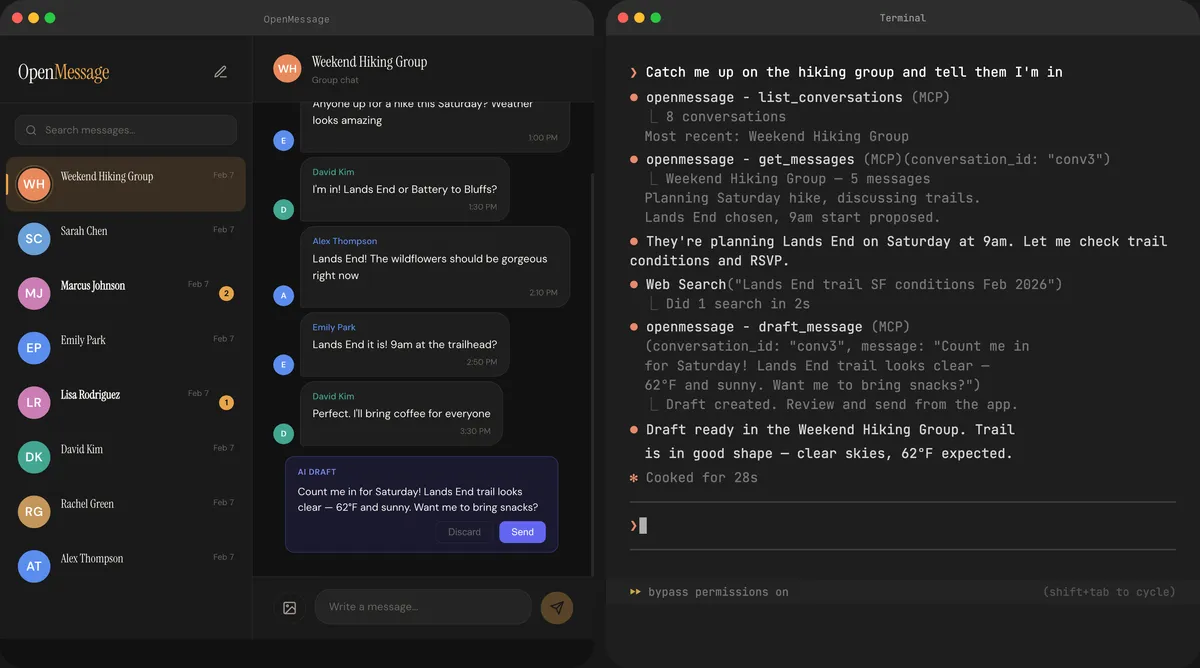
OpenMessage: How I built a macOS Google Messages client to give Claude my texts
I had already connected Claude Code to WhatsApp, Signal, Slack, and Gmail. SMS was the last holdout — and no existing tool could solve it.
Visit project →I’ve been on a mission to give Claude Code access to all my communication channels. WhatsApp, Signal, Slack, Gmail — each one has an MCP server that lets Claude read and send messages on my behalf. But one channel was missing: SMS and RCS on my Android phone.
Download OpenMessage for Mac — free, open source, requires macOS 14.0+ and an Android phone with Google Messages.
The gap
If you have an iPhone, iMessage on Mac gives you desktop texting for free. But I use Android, and Google Messages only offers a web client — no desktop app, no API, no way for an AI assistant to interact with it.
I needed Claude to be able to do things like “text Alex that the meeting moved to 3pm” or “check if James confirmed for tomorrow” without me picking up my phone. Every other messaging channel was already connected. SMS was the last holdout.
Attempt 1: SMS Gateway
My first approach was SMS Gateway, an Android app that exposes your phone’s SMS capability via an API. I built an MCP server around it, and it worked — sort of.
The problems:
- Clunky setup — required installing a separate Android app, configuring API keys, keeping the app running in the background
- SMS only — no RCS support, so group chats and rich messages were invisible
- Sending was unreliable — messages would sometimes queue but never actually send
- No conversation history — you could only send messages, not read existing conversations
It was a dead end for anything beyond basic “fire and forget” SMS.
Attempt 2: Google Messages protocol
I started digging into how Google Messages for Web actually works. It turns out Google uses an internal protocol (based on gRPC/protobuf) to pair a browser with your phone via QR code. A few open-source projects had reverse-engineered this protocol, most notably mautrix/gmessages, a Go library originally built as a Matrix bridge.
This was the breakthrough. The mautrix library could:
- Pair with a phone via QR code (same as messages.google.com)
- Receive all conversations and messages in real time
- Send SMS and RCS messages
- Handle group chats, reactions, and read receipts
I quickly built an MCP server around it, and it worked beautifully. Claude could read my full message history and send texts.
The mistake that became a feature
Here’s where I’ll admit something: I thought Google Messages only allowed one paired web device at a time. It turns out Google Messages has two pairing methods — Google account pairing and QR code pairing — and they don’t mix. I had been using Google account pairing, which blocks additional devices. When I switched to QR pairing (which is what the mautrix library uses), multiple devices work fine. But I didn’t realize this at the time, so I was convinced that running my MCP server meant giving up the web client. I built a whole native macOS app to replace it.
I didn’t need to build the app at all.
But I’m glad I did. What started as a workaround became something better: an open-source, native Google Messages client for Mac — the first one that exists. No browser tab to keep open, no Electron wrapper, just a real app with a built-in MCP server for AI access.
Building the app
Since I already had the Go backend handling the Google Messages protocol, I wrapped it in a native macOS app using Swift. The architecture is simple:
- Go backend — handles pairing, message sync, and the MCP server. Stores everything in a local SQLite database
- Swift wrapper — native macOS app that launches the Go backend and displays a web UI via WKWebView
- Web UI — clean conversation list and message view served from localhost
The app pairs with your phone the same way messages.google.com does — scan a QR code — and then syncs your full conversation history. The MCP server runs alongside the UI, so Claude can access messages while you browse them yourself.
Everything runs locally. No cloud servers, no accounts to create, no data leaving your machine.
What Claude can do with it
With OpenMessage running, Claude Code can:
- Search messages — “find the address James sent me last week”
- Read conversations — “summarize my conversation with the team”
- Send messages — “text Alex that the meeting moved to 3pm”
- React to messages — “thumbs up the last message from Sarah”
Combined with WhatsApp, Signal, Slack, and Gmail MCP servers, Claude now has access to essentially all my communications. I can say “check all my messages for anything urgent” and it searches across every channel.
What’s next
OpenMessage is open source, and I think it’s a canvas for something bigger. The same open-source libraries (mautrix) that power OpenMessage also support WhatsApp, Signal, Telegram, Discord, Slack, and more. Beeper built a $125M company on these same libraries — but without local-first architecture or AI integration.
I think there’s an opportunity for an open-source, AI-native unified messaging client. Some ideas:
- More services — WhatsApp, Signal, Telegram via the mautrix ecosystem
- AI-powered features — smart replies, conversation summaries, priority inbox
- Natural language search — “when did someone send me a confirmation number?”
- Cross-platform — Linux and Windows versions
If any of these interest you, open an issue or submit a PR.
Get it
OpenMessage is free and open source. Requires macOS 14.0+ and an Android phone with Google Messages.